devBooks, the ERP system for business management from dev.al

Accounting and ERP software for businesses in Albania

Sales and purchasing, inventory, manufacturing, payroll, accounting and reports in one system, with real-time data. Ask Devi in the app or on WhatsApp. The subscription starts from 28,000.00 ALL a year, VAT included.

  • 27,000+ businesses work with dev.al apps
  • Invoices from SelfCare go into the accounts by themselves
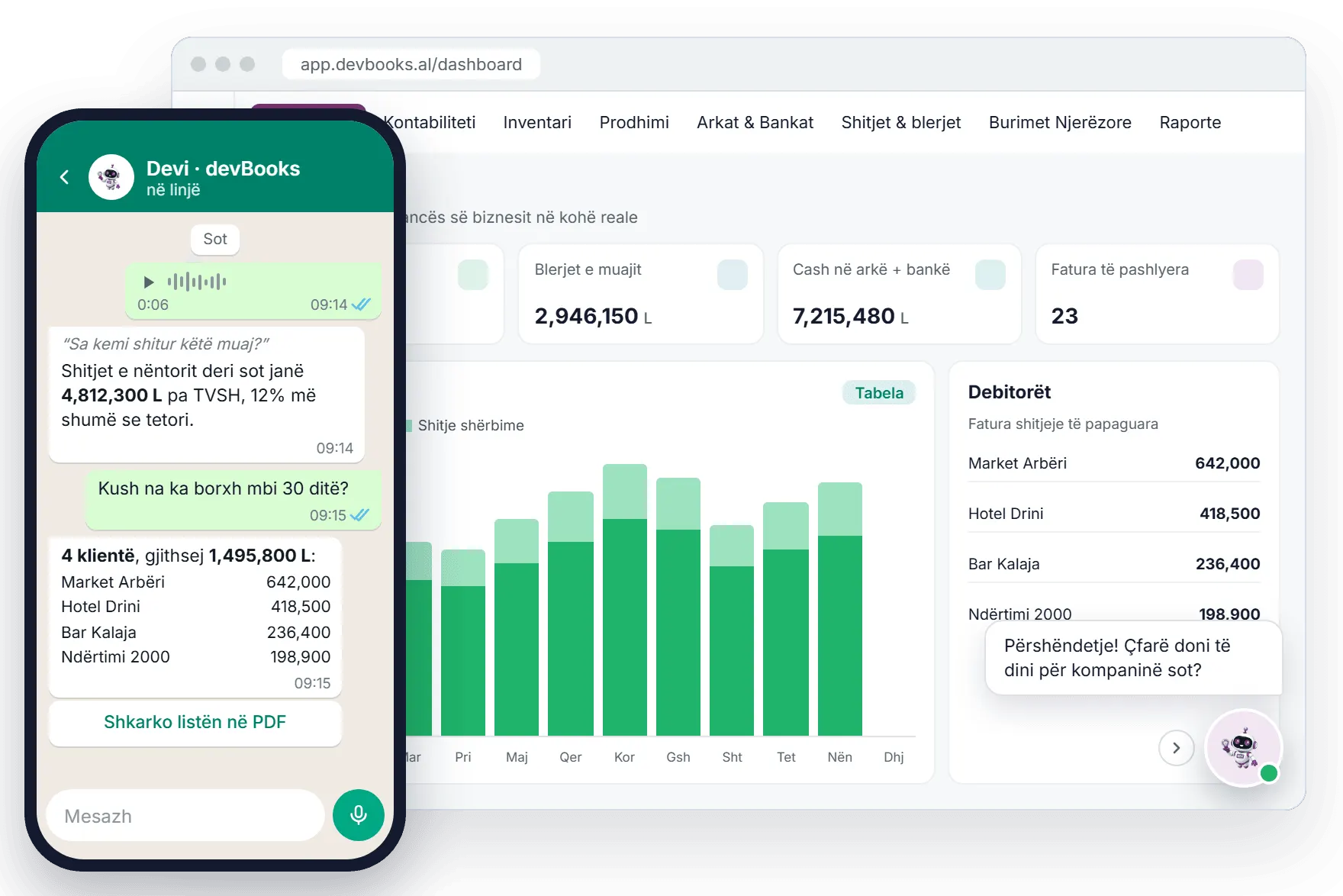
The devBooks dashboard with the month's sales, purchases, cash and debtors, the Devi button in the corner and a conversation with Devi on WhatsApp
The devBooks dashboard on the web, with Devi in the corner, and Devi on WhatsApp. Demo data.

In short

What is devBooks?

A web-based ERP system for business management, built by dev.al. Sales and purchasing, inventory, manufacturing, fixed assets, payroll, points of sale and accounting work together in one place.

Before and after

What does devBooks replace?

Spreadsheets, manual calculations and data entered twice.

  • Today: Excel sheets for expenses

    With devBooks: Cost centres in a tree structure and allocation of expenses across documents and items, with a report for each centre.

    Accounting and finance
  • Today: Calculating payroll by hand

    With devBooks: The payroll calculator with bonuses, deductions and public holidays; the payroll list goes into the accounts by itself.

    Human resources
  • Today: Entering invoices from SelfCare by hand

    With devBooks: Purchase and sales invoices are imported automatically from SelfCare through devPOS.

    Integrations
  • Today: Matching payments to invoices by hand

    With devBooks: Cash and bank vouchers are linked automatically to the matching invoices and to the amounts settled.

    Sales and purchasing

Modules

12 modules that share the same data

Each module covers one part of the work, but they are all connected. The sales invoice generates the stock issue note by itself, and the posting schemes make the accounting entry without anything being entered twice.

Finance

  • Accounting and finance A chart of accounts as a tree and as a table, cash receipt and payment vouchers, several currencies and posting schemes that make the entries for you.
  • Reporting and analytics Around 70 ready-made reports, the financial statements, the sales and purchase ledgers and reports that are emailed automatically.
  • Fixed assets Assets with a unique serial number, tax and management depreciation in parallel, revaluation, additions and disposal.

People

  • Human resources The employee register, the salary calculator with bonuses and deductions, and the payroll list that goes into the accounts on its own.
  • Sales agents Commissions for agents and managers by team, targets with a retroactive bonus on the period's invoices and a ranking of agents.

Sales and operations

  • Sales and purchasing Request, quote, order and invoice linked to each other, invoice settlement and vouchers generated on posting.
  • Inventory and warehouse Several warehouses, goods receipt and issue notes with approval, serial numbers, barcodes and an alert when an item falls below minimum stock.
  • Manufacturing Recipes with legal and management waste, a sheet for every stage and posting schemes for work in progress.
  • Cash desk and point of sale A dedicated point of sale interface, barcode scanning, split payments and a till with a trail for each cashier.

Platform

  • Integrations and data exchange Automatic import from SelfCare and fiscalization through devPOS, integration in both directions and over 35 types of import from Excel.
  • Platform, security and administration Several companies and fiscal years, over 500 permissions in roles, two-step sign-in and a full trail for every document.
  • Devi, the AI assistant An artificial intelligence assistant inside the app and on WhatsApp that reads your real data and understands voice messages.

The full list of features

Integrations

Connected to SelfCare, fiscalization and devPOS

SelfCare and fiscalization are provided through devPOS, which connects to devBooks in both directions. Exchange rates come in by themselves, and what you have in Excel can be imported. Invoices are no longer entered twice.

SelfCare

Purchase and sales invoices are imported automatically.

Provided through devPOS

devPOS

Invoice fiscalization and the connection to SelfCare, kept up to date through a webhook.

Includes fiscalization

devBooks

Accounting, inventory, sales, payroll and reports, with the same data.

  • Bank of Albania

    Exchange rates are updated automatically.

  • Iliria 98

    Reference buying and selling rates.

  • devHR

    Human resources data.

  • devPMS

    Data from the hotel management system.

  • Excel

    Over 35 types of import, with ready-made templates.

The arrows show where the data comes from. SelfCare and fiscalization go through devPOS, which exchanges data with devBooks in both directions.

How the integrations work

Reporting

Real-time reports, without waiting for the month to close

Every posted invoice and voucher appears straight away in the financial statements, in the sales and purchase ledgers and in the management dashboard indicators.

  • About 70 ready-made reports for accounting, sales, purchasing, inventory, fixed assets, manufacturing, cash and bank.
  • Financial statements and tax returns are generated automatically.
  • The sales and purchase ledgers are linked to the invoices and open directly from the interface.
  • Scheduled reports are generated and sent by email at the frequency you choose.
  • Every report exports to Excel and PDF, with the columns and filters saved for next time.

Reporting and analytics in detail

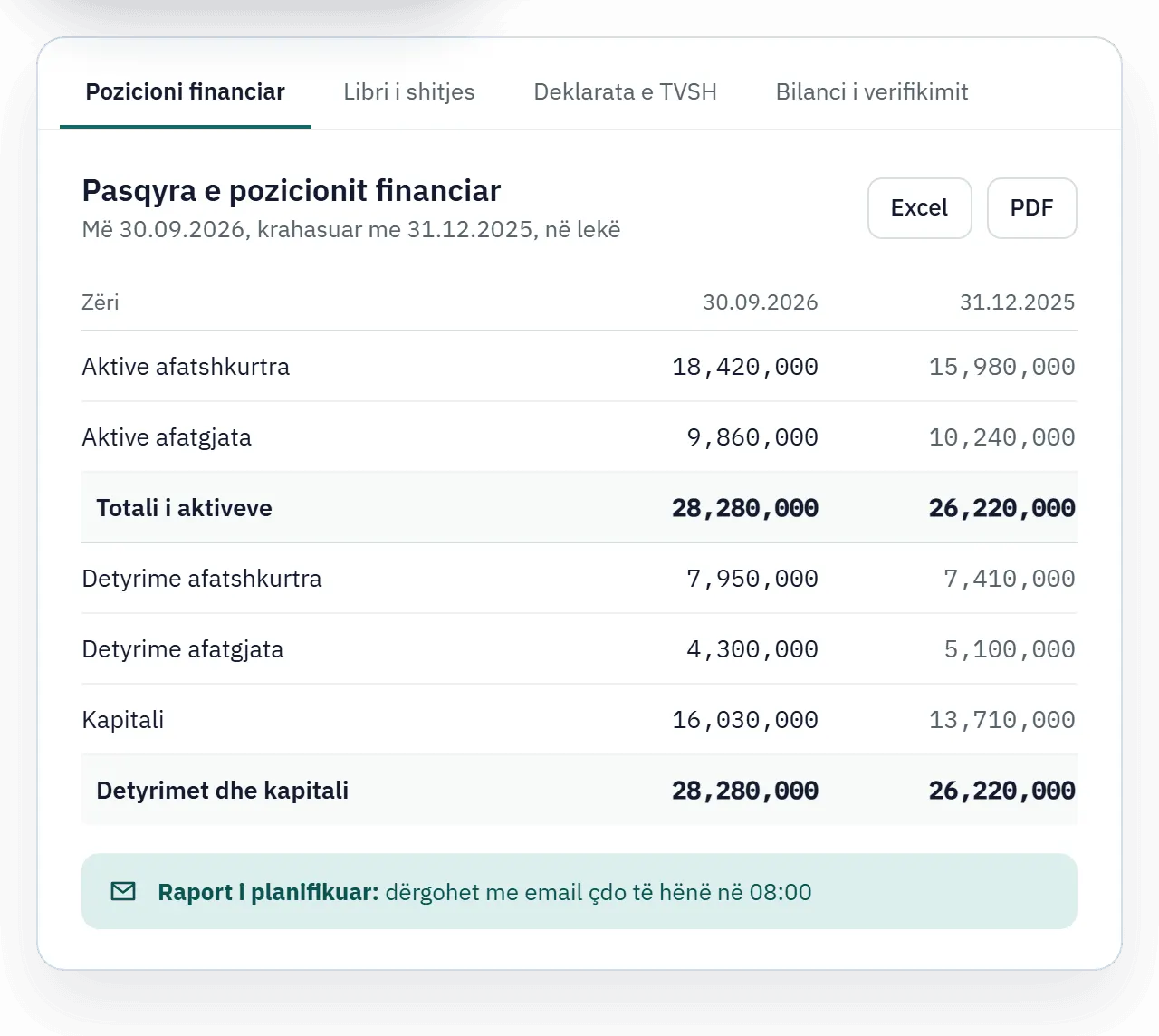
The statement of financial position in devBooks, with the comparison with last year, the Excel and PDF export and a report scheduled by email
A devBooks report, with demo data.

The AI assistant

Devi answers from your own data

Ask in writing or by voice message about a client, an item or an invoice, and Devi answers from your company's records and invoices. You can try it for free.

  • In the app

    As a chat panel or a full-screen page, with answers that contain text, one-click options and files to download.

  • On WhatsApp

    Work with the system from your phone, without opening the app. The number is linked with a verification code that is valid for 10 minutes.

  • By voice

    Voice messages are transcribed automatically and handled as a written request, even when you are out in the field.

How Devi works, step by step

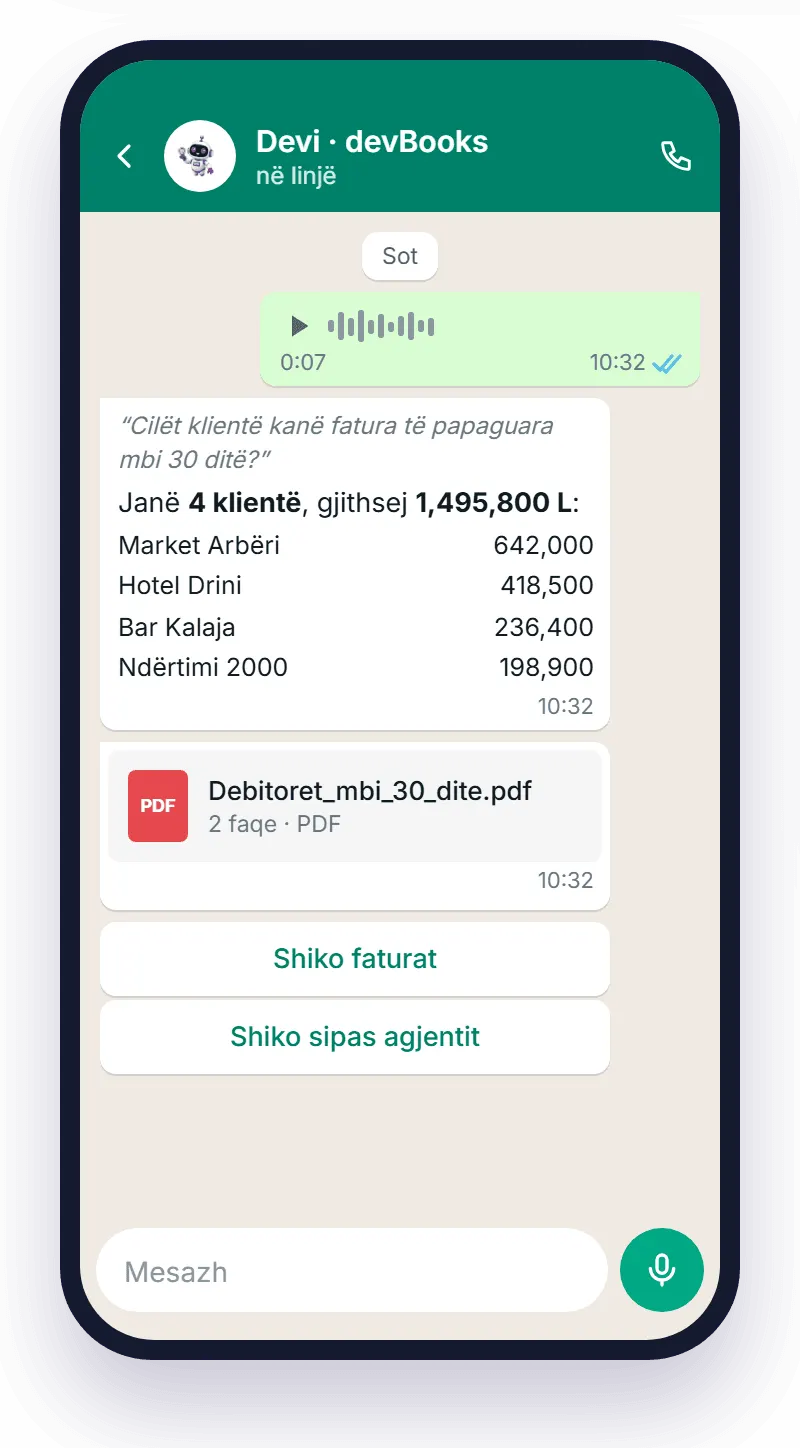
A conversation with Devi on WhatsApp: a voice message about unpaid invoices, the list of clients, the PDF file and the reply buttons
Devi on WhatsApp, with demo data.

Platform and security

Who sees what, and who changed what

Each user sees only what their roles allow, and every change to a document keeps the user's name and the date.

  • Over 500 separate permissions

    Grouped into roles, plus dedicated restrictions for specific users.

  • Two-step sign-in

    Or with a Google account, with lockout after failed attempts and password recovery by email.

  • A full audit trail

    For every document and record: who created it, who changed it and when.

  • Several companies, several years

    Each company has its own database and you switch between them instantly.

  • In Albanian and in English

    The interface is available in both languages.

  • Drafts and background processing

    A draft is saved for every type of document; large operations are processed in the background.

Platform, security and administration

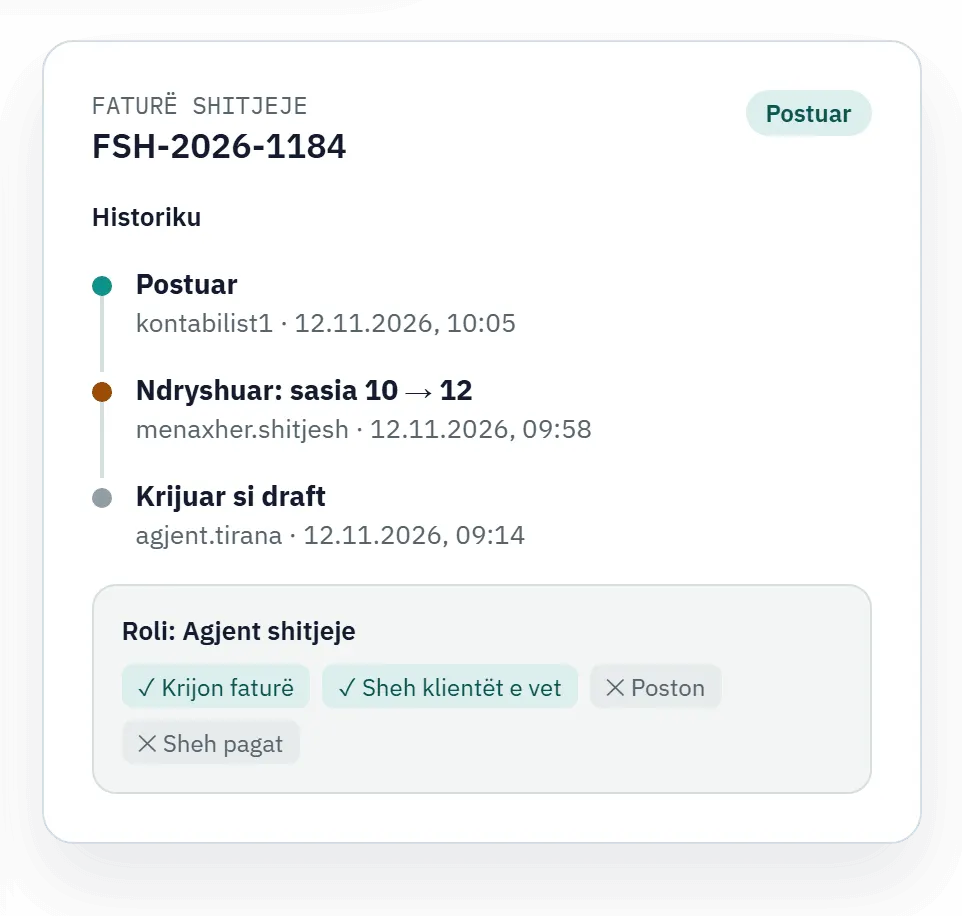
The history of a sales invoice in devBooks, who created, changed and posted it, and the permissions of the Sales agent role
The history of a document and the permissions of a role, with demo data.

Free resources

Guides and tools for taxes and payroll

The deadlines, figures and steps for accounting, fiscalization and payroll in Albania.

Questions

Frequently asked questions

The connection to SelfCare and devPOS, Excel imports, several companies, user permissions and Devi.

  • What is the best ERP in Albania?

    For most businesses, the one that keeps sales, the warehouse, payroll and accounting in one system, without entering invoices twice. devBooks is the ERP system from dev.al, an Albanian software company since 2010 and the maker of devPOS: 12 modules that share the same data, with the invoices from the SelfCare portal and fiscalization going through devPOS automatically. See the modules or request a free demo.

  • What is the best accounting software?

    The one where the journal entries are made from the documents automatically. In devBooks, posting schemes turn invoices, payroll, fixed assets and manufacturing into journal entries by themselves, cash and bank vouchers are matched to the invoices, and the financial statements and tax returns are generated automatically. Accounting firms work with several companies and several fiscal years, each with its own database. See the accounting software in detail.

  • What is the simplest and cheapest ERP?

    The one where you pay only for the modules you use. In devBooks you choose the type of business and add only the modules you need: the subscription starts at 28,000.00 ALL a year including VAT, and you see the exact price straight away in the pricing calculator, without waiting for a quote. It works on the web, with no installation, and you bring in your existing data with over 35 types of Excel import. For schools and training centres it is free, with some limitations.

  • Does devBooks connect to SelfCare and to fiscalization?

    Yes, through devPOS, the fiscalization system from dev.al. Purchase and sales invoices from the SelfCare portal are imported into devBooks automatically. You fiscalize invoices and check their payment status from devBooks as well, without entering anything twice.

  • Can I import data from devPOS?

    Yes. The master records, purchase invoices, sales invoices and the accompanying documents for warehouse movements come over from devPOS automatically. The integration works in both directions through a webhook, so an invoice issued in devPOS appears in devBooks without being imported by hand.

  • Can I work with several companies and several fiscal years?

    Yes. Each company has its own database and you switch from one to another instantly, so an accounting firm keeps its clients in the same system without mixing their data. At the end of the year you close the fiscal year and open the new one, together with the opening balances.

  • How does Devi work on WhatsApp, and can I talk to it by voice?

    Devi works on WhatsApp just as it does inside the app. You link your number with a verification code that is valid for 10 minutes, manually or with a ready-made link. We transcribe voice messages automatically and treat them as a written request, so you can ask for balances, reports or actions by speaking.

  • Can I import my data from Excel?

    Yes. We give you over 35 types of Excel import, with ready-made templates to download, for all the main records and documents. Journal entries, cash and bank vouchers, employees and payroll lists are also imported from Excel.

  • Who sees my data, and how are permissions controlled?

    Only the people who have permission see the data. We give you over 500 separate permissions that you group into roles, plus dedicated restrictions for specific users. Sign-in is in two steps or with a Google account, with the account locked after failed attempts, and for every document we keep a trail of who created it, who changed it and when.

  • Can I edit invoices after they have been posted?

    Yes. You edit sales invoices, purchase invoices and accounting documents as often as the work requires. You configure the posting periods yourself, and the system blocks operations outside the allowed period. Every change is kept in the document's trail.

See devBooks with data like yours

We show you the system in a short demo built around your own processes: accounting, invoices from SelfCare, inventory and the reports you need.

Request a Demo Free

or call or write to